
Among various features in modern washing machines is the keylock feature. Depending on the brand and the model type, they may appear as different symbols.
But commonly, it appears as a lock, a key, letters CL, or other variations. If you want to learn more about it, you’re in the right place.
Read on, and you will learn what the key lock in a washing machine is, how and when to use it, and more.
What Is Key Lock In Washing Machines?
Key lock is a washing machine functionality intended to protect the machine and users during its washing by locking the buttons on the control panel.
This symbol can take various forms depending on the washer model. But generally, it appears as a key lock or CL letters when it is activated.
How It Works

This is a simple process, but sometimes simple steps can be challenging when you’re not used to them.
Here is how it works.
- First, switch on your washer, as this is only possible when it is on.
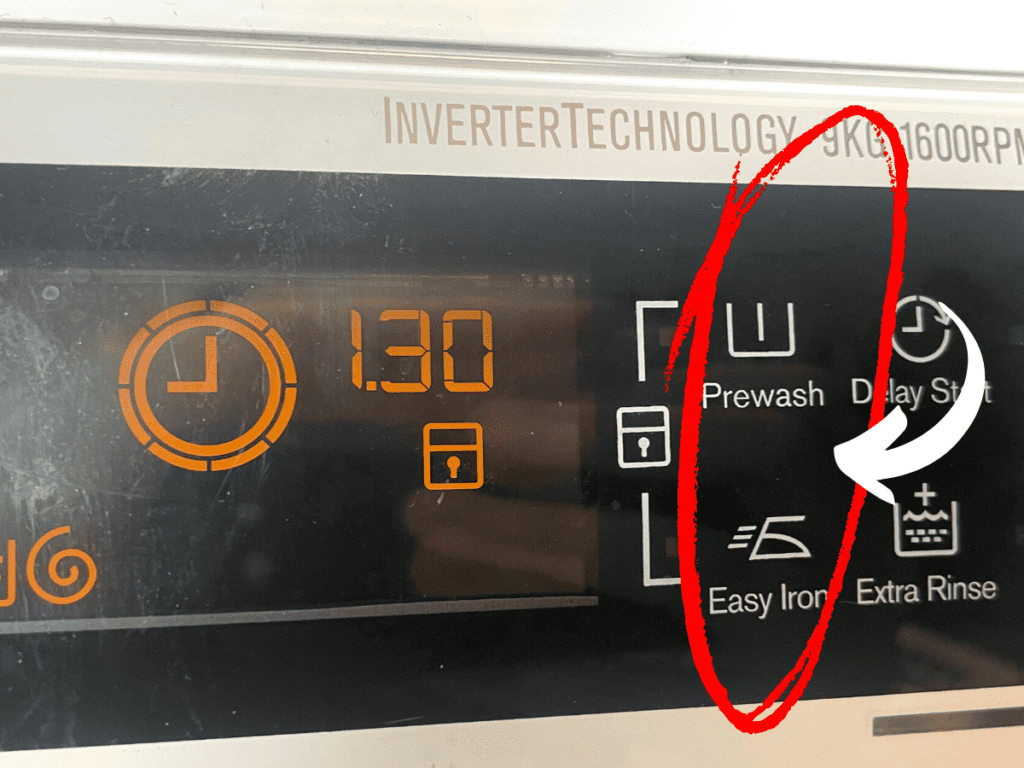
- Next, locate the key lock symbol, appearing as a padlock on the washer dashboard.
- Then press and hold for three seconds, and the padlock symbol will appear. For some models, the “CL” may appear instead. This stands for Child Lock, and it means the same.
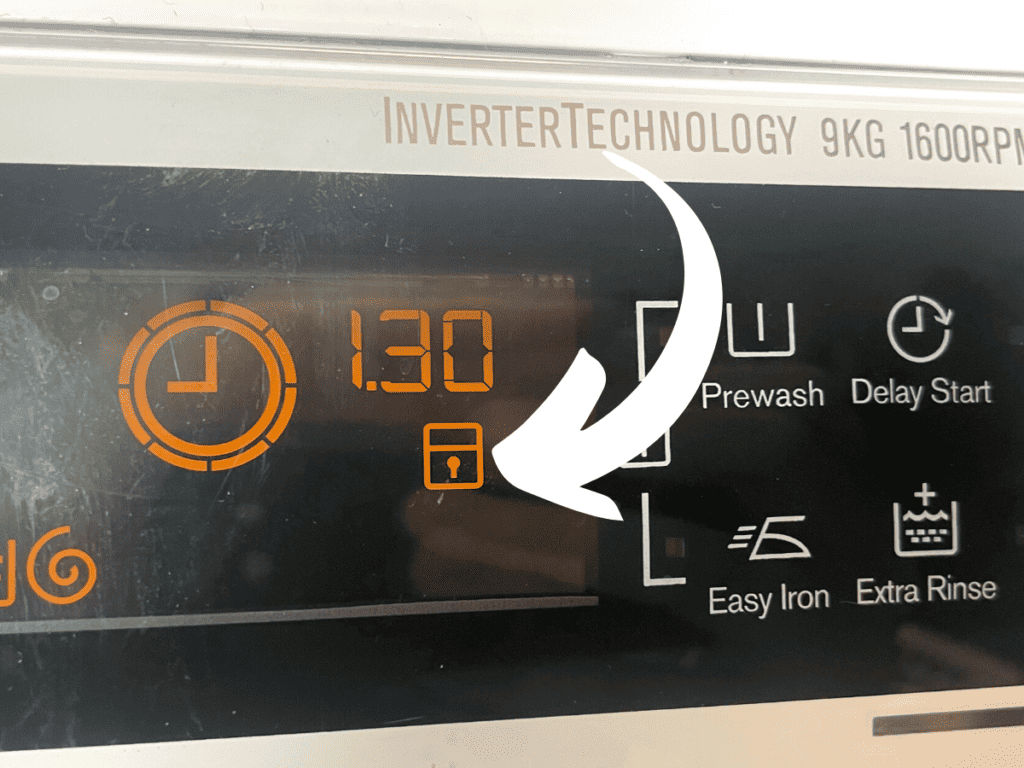
In these models, once the machine has been loaded and the programs has been set, it takes about 15 seconds before a padlock sign lights up.
Once that happens, all the other functionalities are disabled, and you cannot operate the machine in any way other than turning it on or off.
However, this may not always be automatic, so you might have to activate or deactivate it manually.
Once this feature is activated, it stays on, even when the power is switched off, until you deactivate it.
To deactivate it, put the washer on and long press the button for about three seconds, and the lock or CL symbol will disappear.
At this point, the dashboard keys become active, and you can alter the programs as you wish.
Other Methods of Activating/Deactivating the Key Lock
The method we’ve highlighted above may not work with every brand and model. Depending on the models you have, you might require the following procedure.
Pressing Two Buttons Simultaneously

This is common with Bosch washer models, where you’ve got to press buttons indicated as “rpm” and “finished in” together for approximately 3 seconds before the keylock comes off.
To activate, press again for 3 seconds when the machine is powered, and the padlock symbol will appear on the screen.
Pressing the “3-Sec” Button

Still, on Bosch for the most recent models, you can find an illuminated button with a key symbol and a sign, “3 sec” below it. This means the key lock is activated.
To deactivate it, press for about three seconds. It will beep once, and the illumination will disappear. To activate it, repeat the process.
Washers With Dial Program
For washers with a dialing program, the activation and deactivation of the key lock might be a bit different, but it is easy as well.
For this type, you might need to remove the last used program or cycle through various programs and remove the keylock.
This functionality is quite important to protect children from getting harmed when trying to open the washer.
Also, disabling the keys can prevent altering the wash cycle in the mid-process in cases where you accidentally place an item on the dashboard.
Troubleshooting Keylock Issues

In an ideal situation, the key lock activation and deactivation should go on smoothly. Sadly this doesn’t always happen.
Sometimes the keylock functionality might be activated even when the machine is loaded and the door is open.
Other times the cycle might be complete, but the key lock is on, meaning you cannot open the door. This shouldn’t be happening.
Do the following investigations to find the cause of the malfunction.
Has the Timer Lapsed Its Full Cycle?
Check if the timer lapsed its full cycle and drained water. If not, you can use the start/pause button to cancel the cycle.
You’ve Opened the Door Too Soon
Usually, it takes some time before the locking mechanism gets activated.
As is often the case with most digital gadgets, it takes time for the digital locking to complete its circuits. This may take some time for the activation to flow through the system.
Has the Washer Paused?
Again for some technical reason, the washer may have paused. If that happens and more water enters the drum, the key lock activation signal might persist.
Unplug It
Sometimes the locking system needs to disconnect from the power to reboot and reorganize the mechanism.
Try this by unplugging it, and waiting up to 10 minutes before restoring power again.
Seek Professional Help

Sometimes the troubleshooting might not bear fruit. This could be an indication of a deeper problem.
The technical problem could be due to any one of the following issues:
- The door lock or the door could be broken.
- Bent hinges; probably caused by a child that likes to hang on it.
- Broken control board.
All these and probably more could be the culprit. You cannot know for sure unless you are a professional in this field, which most probably you’re not.
So if all troubleshooting fails, do not try to tackle the issue further on your own. Doing so might aggravate the problem, resulting in bigger repair and parts replacement bills.
So it’s best to seek professional help.
Final Thoughts
Keylock is an essential feature found in almost all modern washers. Unfortunately, not everyone is familiar with this program to benefit from its features.
Learning how it works can protect both your washer and other people in your household.
This is an easy-to-use feature, and it does not require much time to learn to use it. Hopefully, this article has equipped you with valuable tips to motivate you to use it more regularly.
I’ve also created a comprehensive guide on how to use all the settings on your washing machine that may interest you to read next.

I’m an expert wardrobe organizer and a bit of a clean freak. I created this website and its YouTube channel to share practical guides about laundry and organizing. My teachings have been featured in multiple large news publications, and I’ve self-published two wardrobe organizing books and an entire course on the subject.